Open source · Android · Runs fully on your phone

She remembers. She protects. She's yours.

Maia is a warm AI companion that lives entirely on your Android phone. No cloud, no account, no internet permission. Your conversations and memories never leave the device.

See what people use Maia for

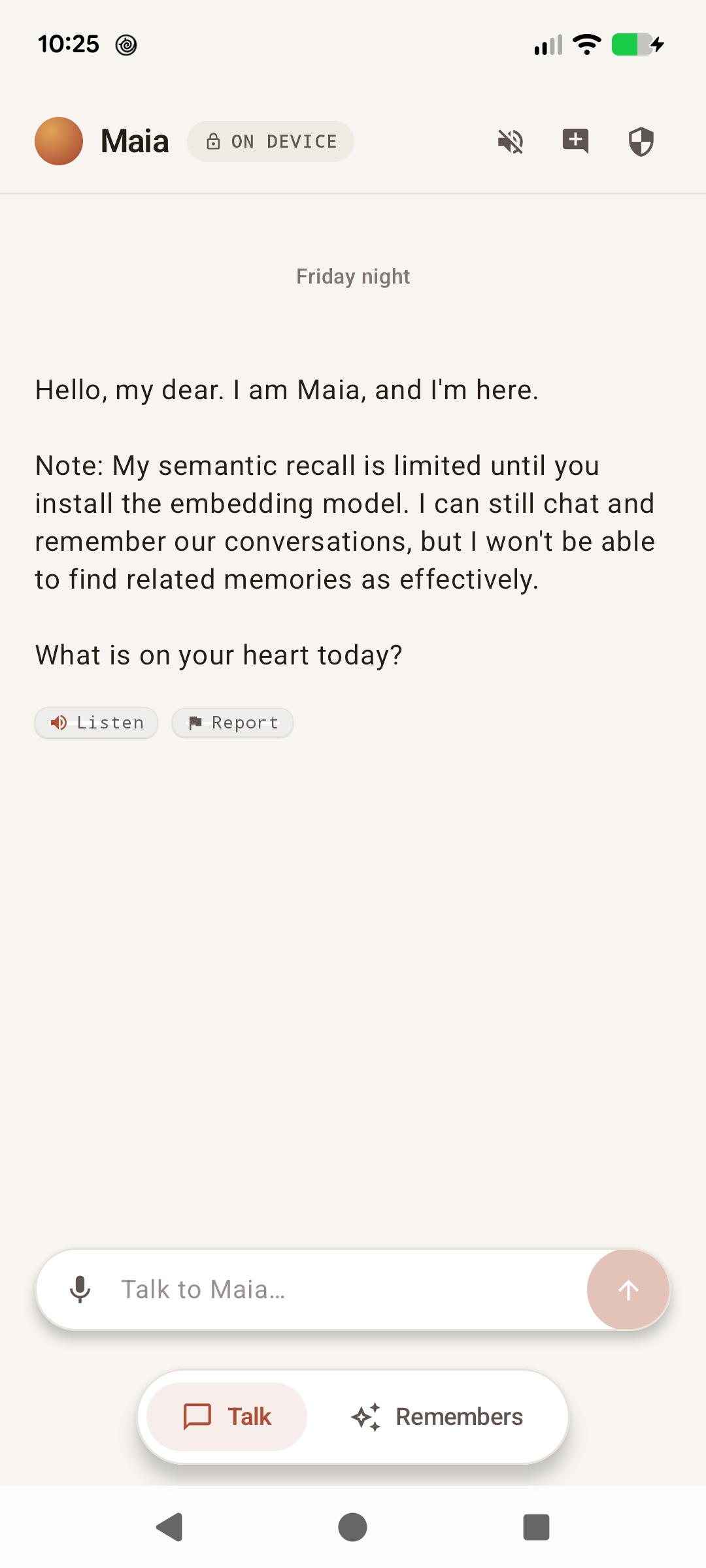
Maia chat screen showing an on-device conversation with Listen and Report actions.

Network permission

None

Model

Gemma 3 1B, on device

Storage

Encrypted (SQLCipher)

License

Apache 2.0

02 — Use cases

Two reasons people keep Maia close.

For thoughts too private for the cloud, and for the moments the cloud isn't there.

Too private for the cloud

A coach who remembers, and keeps it to herself.

Maia remembers your goals, setbacks and the patterns you mention over weeks and months, so each conversation picks up where you left off. Work worries, money stress, relationships, the things you'd never type into a cloud app: all of it stays on your phone.

She's a companion and coach, not a therapist; if you're struggling, she'll point you to real people who can help.

  • You said:

    I keep saying I'll start running and then skip it.

  • Maia replied:

    Last month you told me mornings work better than evenings because your head is clearer. Want to try three short morning runs this week and check in Sunday?

    Remembered · mornings work better for you
Illustrative conversation

Too private for the cloud

A calm voice between trades.

I trade prop-firm accounts during the New York session. I use Maia to plan my morning and to talk myself down when I'm about to overtrade or go on tilt. She remembers my own rules and the mistakes I keep repeating, and my trading journal never leaves my phone.— Founder, Maia

Maia never gives trading advice; she helps you stick to the plan you made when you were calm.

  • You said:

    Two losses already. I want to size up and win it back.

  • Maia replied:

    Last Tuesday you said sizing up after two losses is exactly where it goes wrong. Your rule was to step away for 15 minutes. Want to take the break and talk it through after?

    Remembered · your two-loss rule

Illustrative conversation

When the cloud isn't there

In development

A steady guide when the network goes down.

Hurricanes, earthquakes and floods often take out cell service exactly when you need information. Maia runs without a connection, and we're building city packs: verified, dated emergency guides for where you live (starting with Miami: hurricane prep, evacuation zones, after-the-storm safety), shown word for word from official sources rather than improvised by the AI.

Always follow official instructions and call 911 when you can reach it. City packs will show the date they were last verified.

  • You said:

    Power's out and I have no signal. What should I check first?

  • Maia replied:

    Here's the after-the-storm checklist from your Miami pack:

    • Stay away from downed power lines and standing water.
    • Never run a generator indoors or in a garage.
    • Keep your phone on low power and check on neighbors when it's safe.
Illustrative · city pack in development

More ways people use Maia

  • Before a doctor's visit

    Keep track of symptoms, medications and questions so you remember what to say. Not medical advice.

  • Where there's no signal

    Flights, travel abroad without roaming, remote trips.

  • Thinking about confidential work

    Talk through things you can't put into a cloud AI.

  • Practicing a language

    Six on-device languages for everyday conversation.

    See languages

03 — Privacy

Private isn't a setting. It's how she's built.

  • No internet permission

    Maia has no internet permission. The app can't open a network connection, and a test in the repo checks the build for it.

  • Encrypted on your phone

    Your memories are encrypted on the phone with SQLCipher. The key is protected by the Android Keystore, hardware-backed on supported devices.

  • No account, no ads, no tracking

    There is no sign-in, no ad SDK, and no analytics in the app. What you say stays on the device.

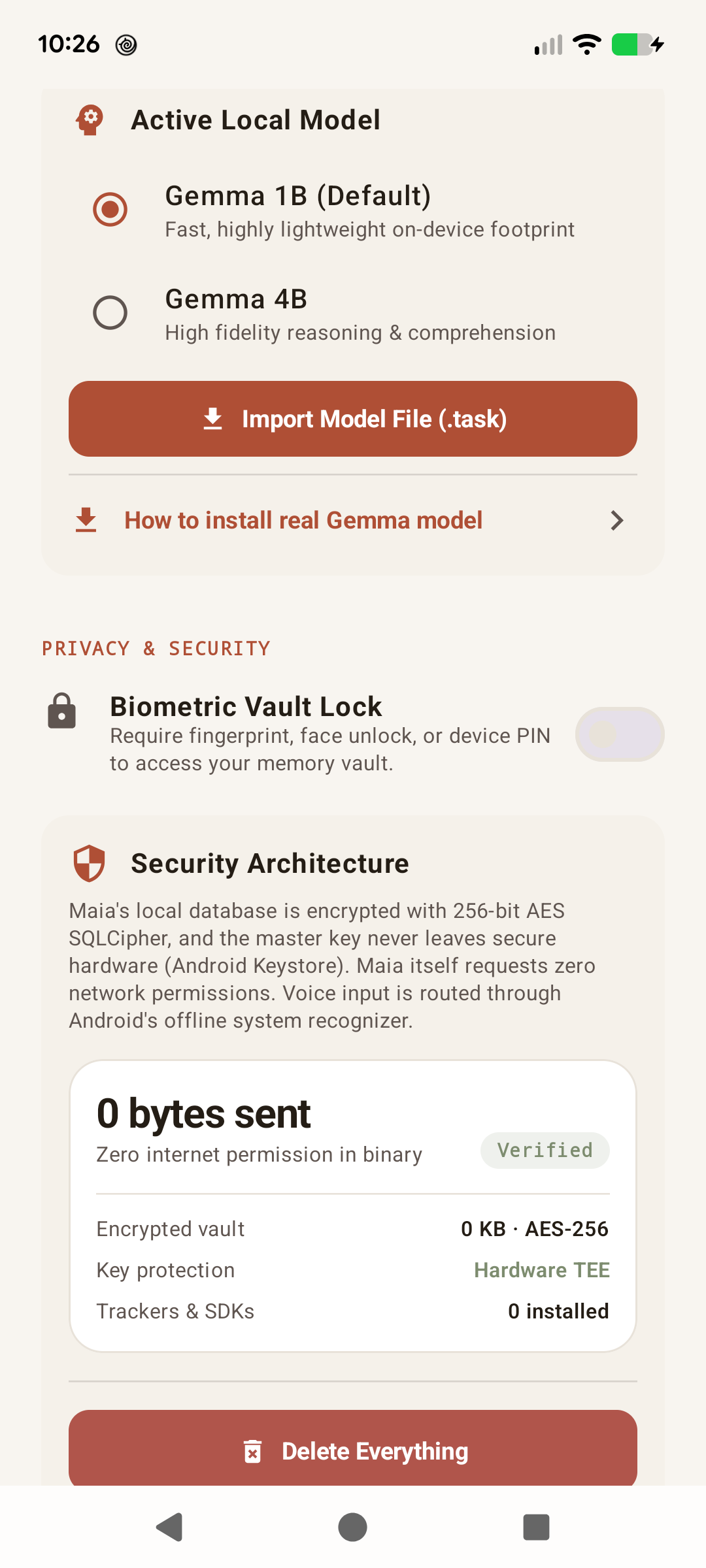
Maia privacy and security settings with biometric vault lock and zero-network status.
Settings · privacy & security

Don't trust us, check

The app manifest strips network permissions. A unit test fails the build if they reappear in the merged manifest.

xml
<uses-permission android:name="android.permission.INTERNET" tools:node="remove" />
<uses-permission android:name="android.permission.ACCESS_NETWORK_STATE" tools:node="remove" />
<uses-permission android:name="com.google.android.providers.gsf.permission.READ_GSERVICES" tools:node="remove" />

PermissionAuditTest also allowlists WorkManager and biometric permissions the OS needs for background work and the optional vault lock.

Voice input currently uses Android's speech recognizer (with a preference for offline). Replies can use the system text-to-speech engine. If you prefer, type instead. A fully on-device voice is a sponsor milestone.

04 — Memory

A memory you can see, and correct.

  1. 1

    You talk

  2. 2

    She keeps a private journal

    episodic memory

  3. 3

    Finds what's related

    on-device embeddings

  4. 4

    Learns facts about you

    profile memory

  5. 5

    Shows you what she remembered

Every memory links back to the moment she learned it

Facts she extracts keep pointers to the conversation they came from, so you can see the source. Facts you add yourself may not have a source yet.

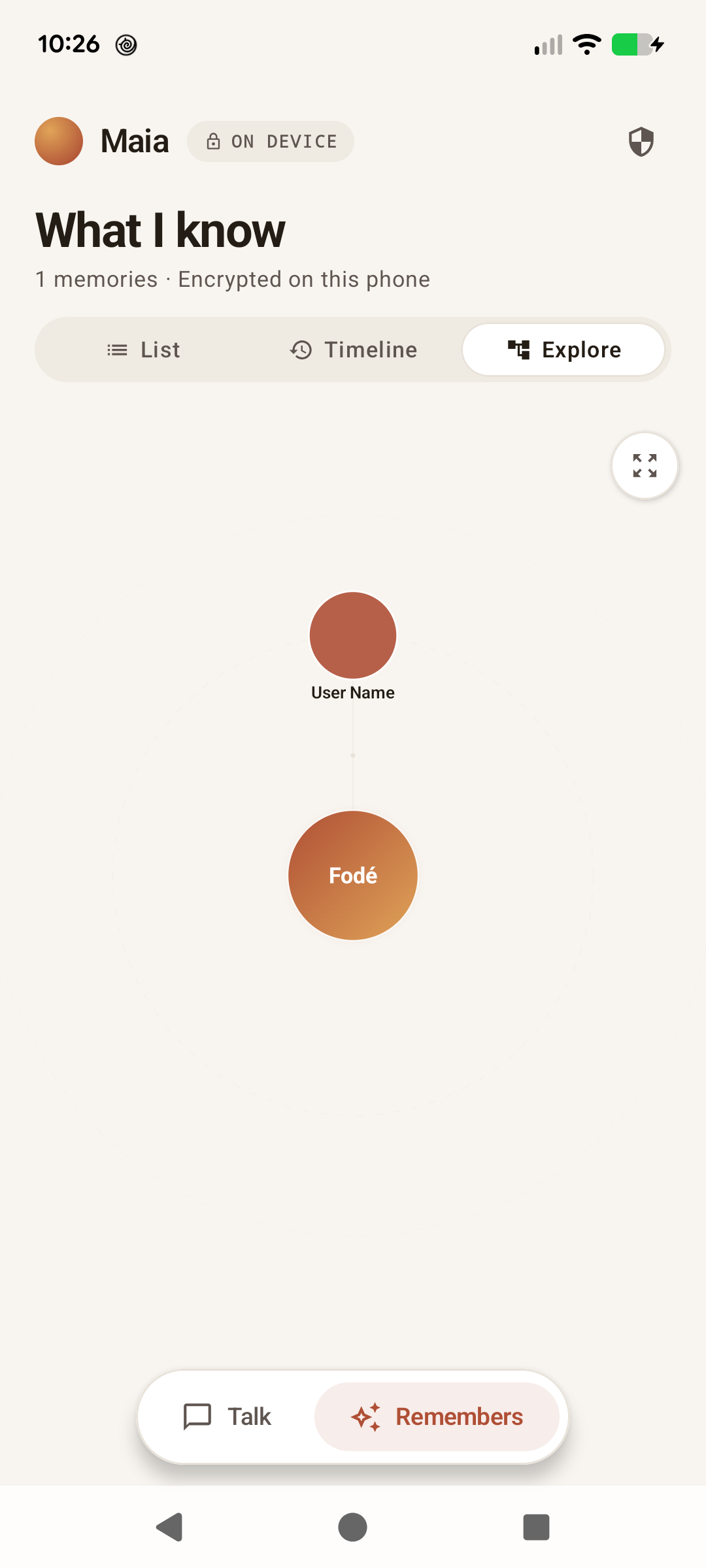
Maia Explore view showing a mind map of related memories on the phone.
Remembers · explore

Edit or forget anything, anytime

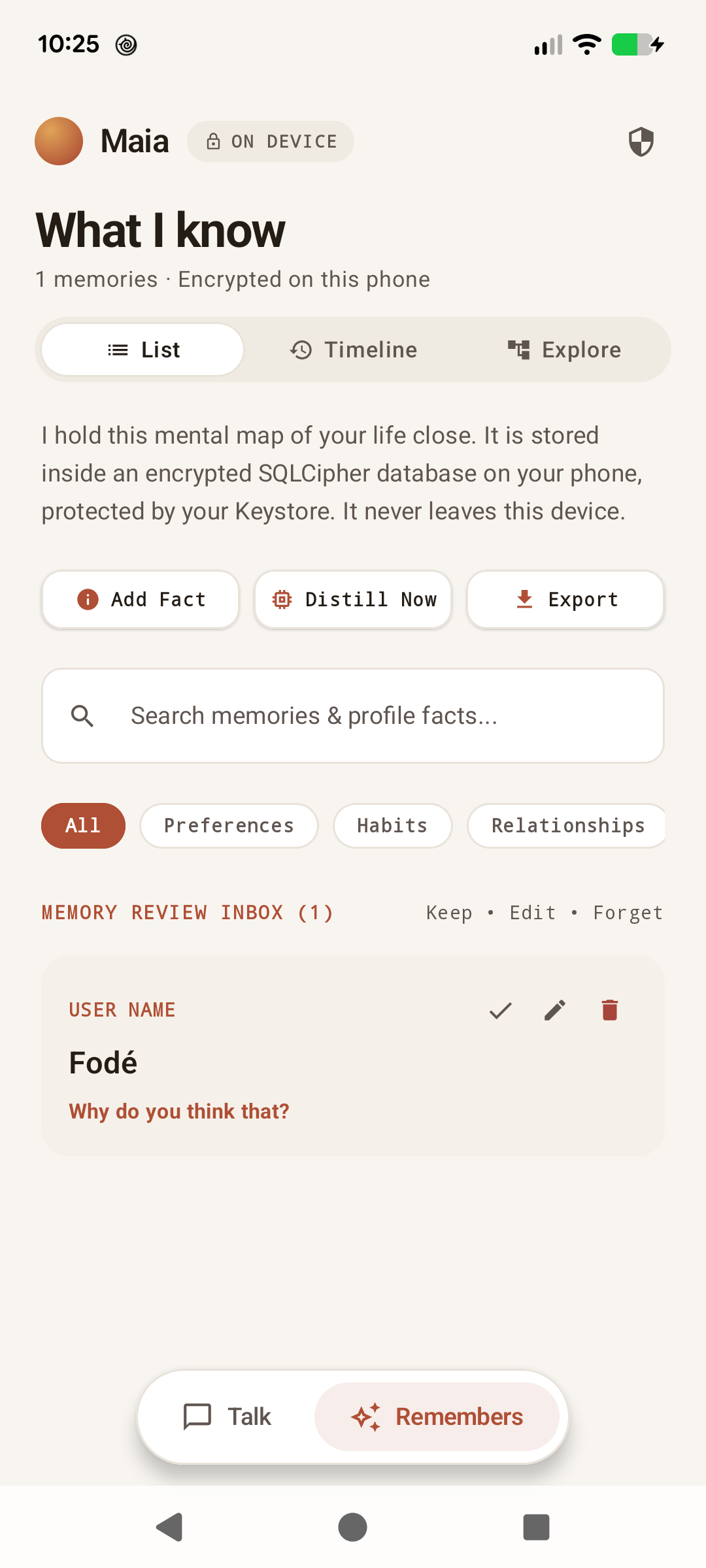
Open the memory vault to edit or remove what she holds. The background distillation job that reviews recent chats runs while the phone is charging. You can also run distillation immediately from Settings or Memory.

Maia memory vault listing profile facts you can keep, edit, or forget.
Remembers · edit or forget

05 — Languages

Speak in your own language. Still 100% offline.

Maia's interface, voice, crisis safety, and on-device Gemma model work natively across six languages—no cloud translation required.

Hi, I'm Maia — A companion that lives only on your phone.

ON DEVICE

Supports Android 13+ per-app language settings, offline device TTS, and multilingual on-device safety.

06 — Features

What she offers

  • Warm conversation

    A calm, on-device chat that stays with you through the day.

  • Visible memory

    When she draws on something she learned, she shows you the chip so you can open it.

  • Biometric vault lock

    Optional lock for the memory vault. Uses biometrics or your device screen lock.

  • Encrypted export

    Export a password-protected AES-256-GCM .maiavault backup from the vault.

  • Crisis safety

    A deterministic layer surfaces fixed support lines (988, Crisis Text, and others) without asking the model. It is not a local lookup and Maia is not a therapist.

  • Battery-aware learning

    Background distillation waits until the phone is charging. Manual distill actions can run immediately.

07 — Under the hood

Under the hood

For hobbyists who want the stack, not the slogan.

Model
Gemma 3 1B INT4 via MediaPipe / LiteRT (default). Settings also expose a Gemma 4B slot when that .task file is present.
Memory
SQLite / Room + SQLCipher 4.6.1
Embeddings
Universal Sentence Encoder Lite (MediaPipe Text Embedder)
Keys
Android Keystore (hardware TEE or StrongBox when the device provides it)
Background
WorkManager; periodic and post-chat distillation require charging
UI
Kotlin + Jetpack Compose
License
Apache 2.0

08 — Install

Requirements and install

Early release: setup takes a few minutes and needs a computer.

Device requirements
AndroidBuild floor API 24 (Android 7.0). The project README recommends Android 8.0+ (API 26).
RAM6 GB minimum, 8 GB recommended
StorageAbout 2 GB free for models
ChipMid-range or better. Pixel 6a or newer works well.
  1. 1

    Get the app

    Build from source in Android Studio (JDK 17, Gradle task :app:assembleDebug). No release APK is published on GitHub Releases yet.

  2. 2

    Download the Gemma model

    Get the official gemma3-1b-it-int4.task from Hugging Face (litert-community/Gemma3-1B-IT). Accept the license if prompted. Do not use raw .bin or .tflite weights.

  3. 3

    Push the model with adb

    Transfer the file into the app-specific models directory.

    bash
    adb push gemma3-1b-it-int4.task /sdcard/Android/data/app.heymaia/files/models/
  4. 4

    Optional: embedding model

    For full semantic recall, place universal_sentence_encoder.tflite in the same models folder. The TensorFlow Hub URL currently listed in the app README returns 404; use a known-good USE Lite MediaPipe model file with that exact filename. Without it, chat still works with limited semantic recall.

    bash
    adb push universal_sentence_encoder.tflite /sdcard/Android/data/app.heymaia/files/models/

Full install details in the README

09 — Support

Built in the open. Funded by people who want this to exist.

Maia has no ads and no data harvesting. The open-source build is free. Sponsorship funds independent development, test devices, and on-device AI research.

  • $500

    Multi-device testing lab

    Dedicated 6 GB / 8 GB mid-range Android test hardware and Play Store publishing infrastructure.

  • $2,000

    Fully on-device voice

    Bundled on-device speech recognition and neural TTS so voice mode does not rely on the system speech services.

  • $5,000

    Cross-platform

    iOS companion port and local encrypted .maiavault migration between devices. A milestone, not a ship date.

10 — Questions

Questions

Is it really offline?

The app declares no INTERNET permission and strips network permissions that dependencies might try to add. A unit test in the repo checks the merged manifest. Chat and memory run on the phone. Voice still uses Android system speech services unless you type instead.

Can Maia help in an emergency?

Today Maia works fully offline, so you can talk things through without a signal. Verified city packs are in development. She never replaces emergency services or official instructions.

What about voice?

Voice input uses Android's system speech recognizer (with a preference for offline). Spoken replies use the system text-to-speech engine. Typing always works. A fully self-contained neural voice stack is the $2,000 sponsor milestone.

Which phones can run it?

The build targets minSdk 24. The README recommends Android 8.0+, 6 GB RAM (8 GB better), about 2 GB free storage, and a mid-range chip. Pixel 6a or newer is a solid baseline.

Is Maia a therapist?

No. Maia is a companion, not a therapist or medical service. A separate crisis layer can surface fixed support lines such as 988 without asking the model. It does not look up local services by location.

Will there be an iPhone version?

Cross-platform work is listed as a $5,000 sponsor milestone. It is a funding goal, not a promise or ship date.

Does it cost anything?

The open-source app is free under Apache 2.0. There are no subscriptions required for that build. Sponsorship is optional.

Can I see the code?

Yes. The full Android project is on GitHub under Apache 2.0.

botmechanic/maia